The Proposal-First Alternative to Knowify
Knowify is built around job costing, contract management, and QuickBooks sync. Takeoff Convert is a specialized tool for estimators who need fast, professional proposals from their takeoffs, without configuring an entire financial back office first.
Stay on Knowify if…
Knowify is for trade contractors who bill commercial and GC work: AIA-style progress billing, retainage, certified payroll, job costing against budgets, purchase orders and a tight QuickBooks Online sync. If you run subcontracts for general contractors and your bookkeeper lives in QuickBooks, it solves real problems.
- You bill GCs on AIA forms with retainage and need it synced to QuickBooks.
- Job costing against budgets is how you know whether you made money.
- You run certified payroll on public work.
Essentials ~$149, Plus ~$249, Enterprise ~$299+/month (vendor site, Nov 2026)
Switch to Takeoff Convert if…
- You feel this on Knowify: configuring a job-costing system before the first proposal goes out
- You feel this on Knowify: estimating from a catalog with no AI drafting or takeoff import
- You feel this on Knowify: paying for AIA billing and QuickBooks sync you may not need yet
- You quote your own jobs and want the describe-the-job estimate, the proposal, the e-signature and the deposit in one flow.
- You want every AI price to carry a source: BLS metro wages for labor, a named supplier page for materials.
Free for 3 quotes, then $29/month flat, no per-seat pricing
Takeoff Convert vs Knowify: 15 capabilities
Knowify column as listed on their site and in public documentation on Nov 6, 2026. Verify current details before you buy; vendors change plans.
| Capability | Takeoff Convert | Knowify |
|---|---|---|
| Primary job | Describe-the-job estimating that ends in a signed, paid proposal. Nothing else. | Job costing, contract management and progress billing for trade contractors, synced to QuickBooks. |
| Describe-the-job AI estimate | Yes. Type or say the job; the AI writes scope, quantities and line items in about a minute. | No. Estimates are built from catalog items and templates. |
| Import an existing takeoff or bid | Yes. PDF, Excel or CSV takeoff and bid imports become priced lines; alternates and allowances are kept. | Estimate line import from spreadsheets; no takeoff tool. |
| Where labor prices come from | Hours × the BLS OES mean wage for the trade in your metro × burden, with the series cited on the line. | Your labor rates and cost codes; no external wage source. |
| Where material prices come from | A live supplier price found on the web, with the retailer page and date cited on the line. | Your catalog and purchase orders; no live supplier pricing on the estimate. |
| Your own price book learns | Your price book always wins; after 3 won jobs a line's learned price becomes the default. | Catalog with set prices; actuals tracked in job costing, catalog not updated automatically. |
| Scope narrative in the proposal | Yes. A written scope of work per section, editable in chat ('make it two coats'). | Contract text you write or template. |
| Branded proposal templates | 8 branded templates, 4 designs, your logo and colors; Word and PDF export. | Yes, branded proposals and contracts. |
| E-signature | Hosted accept-and-sign page; you are notified the moment it is signed. | Yes, e-signature on proposals and change orders. |
| Deposit collected from the proposal | Yes. The signed proposal requests the deposit through Stripe Connect; card or ACH; money goes to your account. | Yes, online payments on invoices; progress and AIA billing. |
| Change orders from a signed job | Yes. 'Start change order' from any signed job, numbered under the parent. | Yes, change orders with approval that flow into job costing. |
| Follow-up reminders on unsigned bids | Yes. Automatic reminders on unsigned bids at day 2 and day 5, owner notified on view. | Not a listed feature. |
| Job costing, AIA billing, QuickBooks | No scheduling, dispatch, time tracking or job costing. Invoices only for deposits and milestones. | Yes, the core: budgets vs actuals, retainage, certified payroll, QuickBooks Online two-way sync. |
| Pricing model | $29/mo flat (Pro) or $99/mo for 3 seats (Business). No per-user pricing. | Per company per month: Essentials ~$149, Plus ~$249, Enterprise ~$299+. |
| Free tier | 3 priced quotes free with no card; one job free on /try with no account. | 14-day trial; no free plan. |
What each one costs
Knowify plans as listed on Nov 6, 2026. Takeoff Convert prices are the live plans below.
Knowify
| Plan | Price | Includes |
|---|---|---|
| Essentials | ~$149/mo | Estimates, contracts, invoicing, scheduling, QuickBooks sync. |
| Plus | ~$249/mo | Job costing, purchase orders, time tracking, AIA progress billing. |
| Enterprise | ~$299+/mo | Certified payroll, advanced reporting, more users. |
Takeoff Convert
| Plan | Price | Includes |
|---|---|---|
| Free | Free | Price your first jobs, no card |
| Pro | $29/mo · $199/yr | For the contractor who sends the bids |
| Business | $99/mo · $495/yr | For the office with estimators |
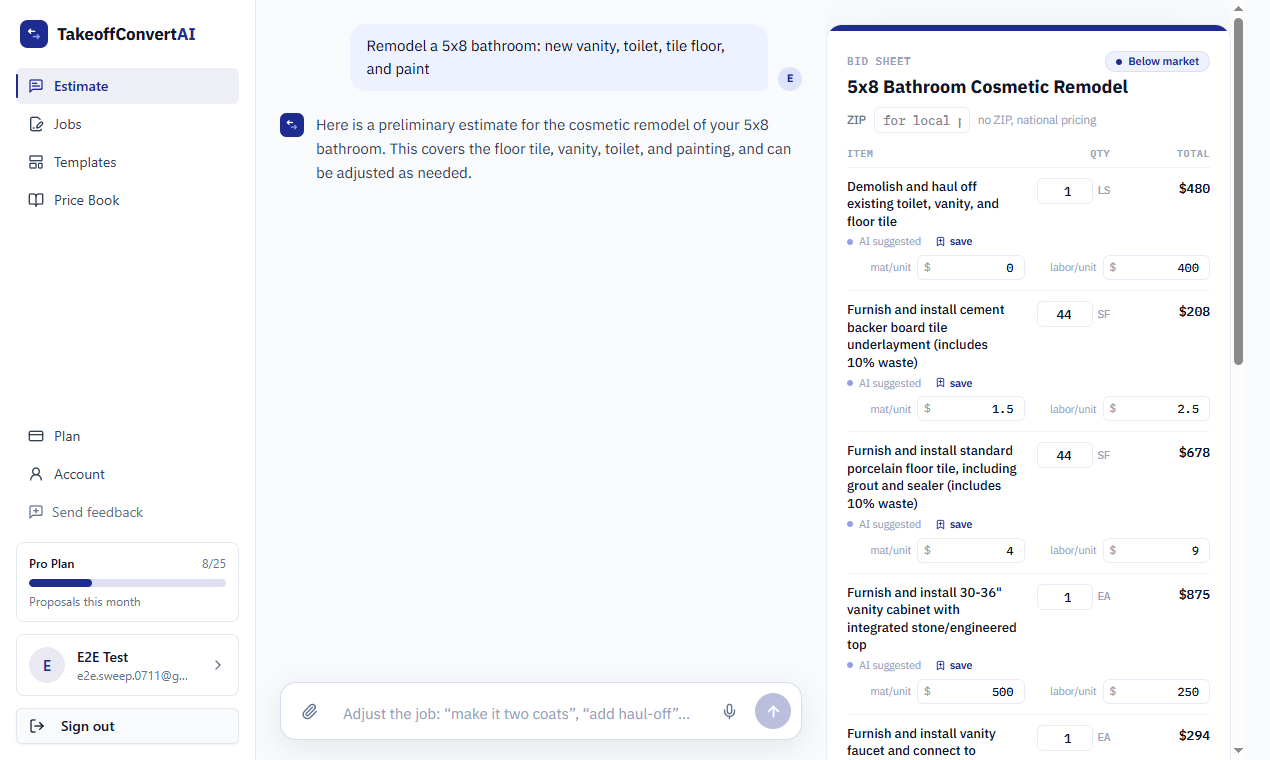
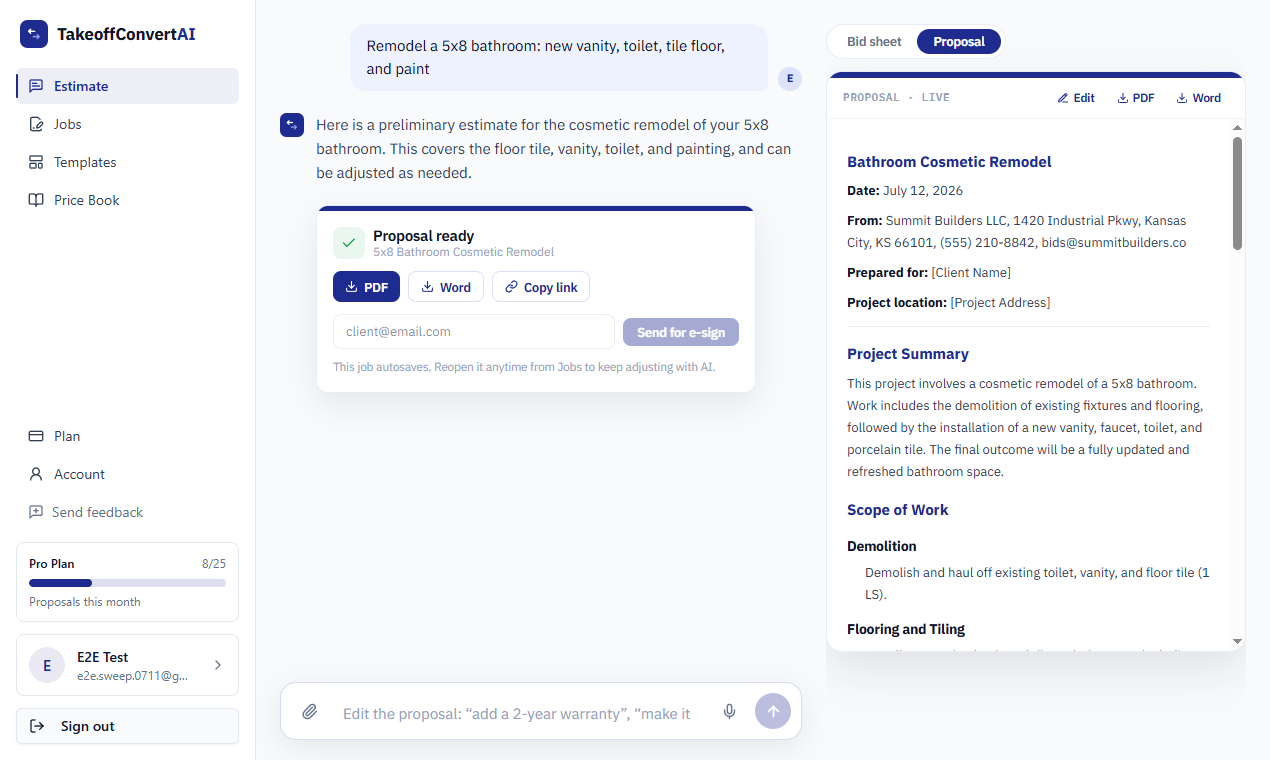
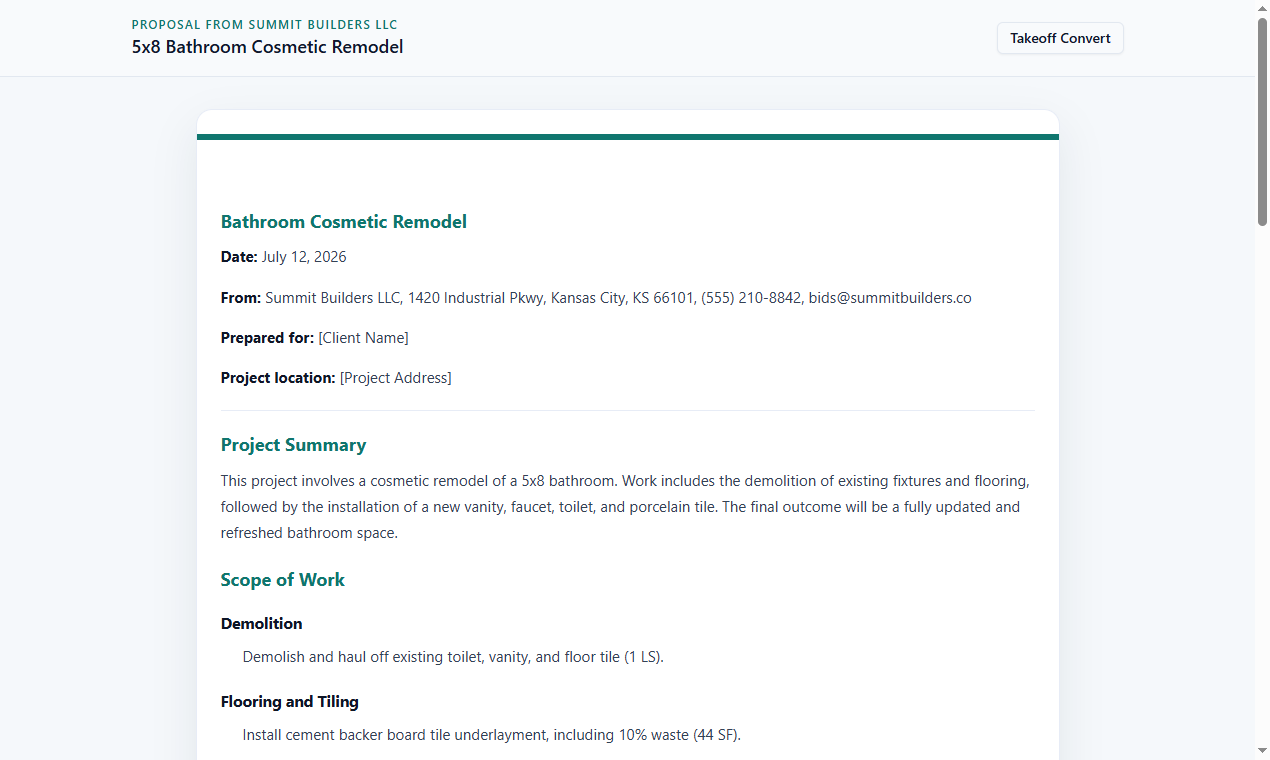
What the Takeoff Convert flow looks like
Three screens from the product, not mockups: the described job priced, the proposal, the client's signing page.
Moving your bids off Knowify
- 1
Export the catalog and cost codes
Knowify exports items to CSV. Import them into the Takeoff Convert price book so your rates lead.
- 2
Bid from the description or the takeoff
Describe the job or import the bid; you get a scoped, itemized proposal with cited starting prices for new items.
- 3
Sign and collect the deposit
Hosted accept, e-sign and deposit via Stripe Connect; follow-ups at day 2 and 5; change orders from the signed job.
- 4
Cost the job where you cost jobs
Takeoff Convert does not do job costing or AIA billing. Enter the won job in Knowify or QuickBooks for that; export the proposal to Word or PDF for the file.
Knowify vs Takeoff Convert: questions contractors ask
Does Knowify have AI estimating?
Not as listed; estimates are built from catalog items and templates. Takeoff Convert generates the lines and quantities from a described job or an imported takeoff and prices them from your book, BLS wages and supplier pages, with the source on each line.
Can Takeoff Convert do AIA progress billing or retainage?
No. It invoices deposits and milestones from a signed proposal. If you bill GCs on AIA forms, Knowify or your accounting system should keep that job.
How do the prices compare?
Knowify starts around $149/month. Takeoff Convert Pro is $29/month and Business is $99/month for 3 seats, month to month, with 3 quotes free first.
Does Takeoff Convert sync with QuickBooks?
No accounting sync today. Proposals, signed PDFs and deposit records export; your bookkeeper enters the job in QuickBooks. If two-way sync is essential, Knowify is the stronger back office.
Will my Knowify estimates import?
Export the estimate as a spreadsheet or PDF and drop it into the estimate chat; the lines become a priced bid you can edit and send. The catalog imports into the price book from CSV.
Takeoff Convert plans
Flat monthly pricing. Starting at $29/month vs Knowify's $149/month.
Free
Price your first jobs, no card
3 quotes, no card
- 3 quotes with cited prices
- Watermarked PDF
- 2 proposal templates
- Your price book and markups
Pro
For the contractor who sends the bids
7-day free trial • Cancel anytime
- Unlimited quotes with cited prices
- All proposal templates
- Send for e-signature
- Deposits from the signed proposal
- Learned price book
- 150 AI edits a day
Business
For the office with estimators
7-day free trial • Cancel anytime
- Everything in Pro
- 3 seats
- Shared price book
- Priority support
Try the describe-the-job estimate on one of your real jobs
Type the job the way you'd say it to your crew. Labor from the BLS wage for your metro, materials from live supplier prices, each with its source. No account for the first job.
Price a job free