The Dedicated Proposal Alternative to Buildertrend
Buildertrend is a full all-in-one construction project management suite. Takeoff Convert is a specialized tool for estimators who just need detailed, professional proposals from their takeoffs, without paying for scheduling, CRM, and job costing you don't use.
Stay on Buildertrend if…
Buildertrend is the right system for a home builder or remodeler running several jobs at once with subs, selections, schedules, daily logs, change orders, client and sub portals and QuickBooks all in one place. If you are managing projects rather than mostly bidding them, it earns its price.
- You manage multiple active jobs with subs, selections and schedules and your clients use the portal.
- Job costing against a cost catalog and QuickBooks sync are central to how you run the business.
- You bid a few large jobs a year and win most of them; bidding speed is not the bottleneck.
- You have office staff to run the system.
Essential, Advanced and Complete tiers from about $199/month; annual contracts and onboarding (vendor site, Nov 2026)
Switch to Takeoff Convert if…
- You feel this on Buildertrend: paying for a whole PM suite to get a proposal out
- You feel this on Buildertrend: a long onboarding before the first bid
- You feel this on Buildertrend: estimating that assumes a cost catalog you have to build first
- You quote your own jobs and want the describe-the-job estimate, the proposal, the e-signature and the deposit in one flow.
- You want every AI price to carry a source: BLS metro wages for labor, a named supplier page for materials.
Free for 3 quotes, then $29/month flat, no per-seat pricing
Takeoff Convert vs Buildertrend: 15 capabilities
Buildertrend column as listed on their site and in public documentation on Nov 6, 2026. Verify current details before you buy; vendors change plans.
| Capability | Takeoff Convert | Buildertrend |
|---|---|---|
| Primary job | Describe-the-job estimating that ends in a signed, paid proposal. Nothing else. | End-to-end construction project management for builders and remodelers. |
| Describe-the-job AI estimate | Yes. Type or say the job; the AI writes scope, quantities and line items in about a minute. | No. Estimates are built from your cost catalog and templates; AI features assist with admin. |
| Import an existing takeoff or bid | Yes. PDF, Excel or CSV takeoff and bid imports become priced lines; alternates and allowances are kept. | Estimates import from spreadsheets; takeoff via a partner integration on higher tiers. |
| Where labor prices come from | Hours × the BLS OES mean wage for the trade in your metro × burden, with the series cited on the line. | Your cost catalog; no external wage source. |
| Where material prices come from | A live supplier price found on the web, with the retailer page and date cited on the line. | Your cost catalog; supplier pricing via integrations on higher tiers. |
| Your own price book learns | Your price book always wins; after 3 won jobs a line's learned price becomes the default. | Cost catalog with set prices; actuals are tracked in job costing but do not update the catalog automatically. |
| Scope narrative in the proposal | Yes. A written scope of work per section, editable in chat ('make it two coats'). | Proposal text you write or template; nothing generated from the job. |
| Branded proposal templates | 8 branded templates, 4 designs, your logo and colors; Word and PDF export. | Yes, branded proposals from the estimate. |
| E-signature | Hosted accept-and-sign page; you are notified the moment it is signed. | Yes, clients approve and sign in the client portal. |
| Deposit collected from the proposal | Yes. The signed proposal requests the deposit through Stripe Connect; card or ACH; money goes to your account. | Yes, online payments on invoices through the client portal. |
| Change orders from a signed job | Yes. 'Start change order' from any signed job, numbered under the parent. | Yes, a mature change-order workflow with client approval. |
| Follow-up reminders on unsigned bids | Yes. Automatic reminders on unsigned bids at day 2 and day 5, owner notified on view. | Lead and proposal follow-up activities in the CRM; manual or templated. |
| Scheduling, daily logs, selections, subs | No scheduling, dispatch, time tracking or job costing. Invoices only for deposits and milestones. | Yes, the core of the product, plus QuickBooks and Xero sync. |
| Pricing model | $29/mo flat (Pro) or $99/mo for 3 seats (Business). No per-user pricing. | Per company per month from about $199 (Essential) to $499+ (Complete); annual contracts. |
| Free tier | 3 priced quotes free with no card; one job free on /try with no account. | Demo only; no trial or free plan listed. |
What each one costs
Buildertrend plans as listed on Nov 6, 2026. Takeoff Convert prices are the live plans below.
Buildertrend
| Plan | Price | Includes |
|---|---|---|
| Essential | ~$199/mo | Scheduling, daily logs, to-dos, client portal, basic estimates and proposals. |
| Advanced | ~$499/mo | Change orders, selections, bids, QuickBooks sync, lead management. |
| Complete | ~$799+/mo | Job costing, purchase orders, takeoff integration, advanced reporting. |
Takeoff Convert
| Plan | Price | Includes |
|---|---|---|
| Free | Free | Price your first jobs, no card |
| Pro | $29/mo · $199/yr | For the contractor who sends the bids |
| Business | $99/mo · $495/yr | For the office with estimators |
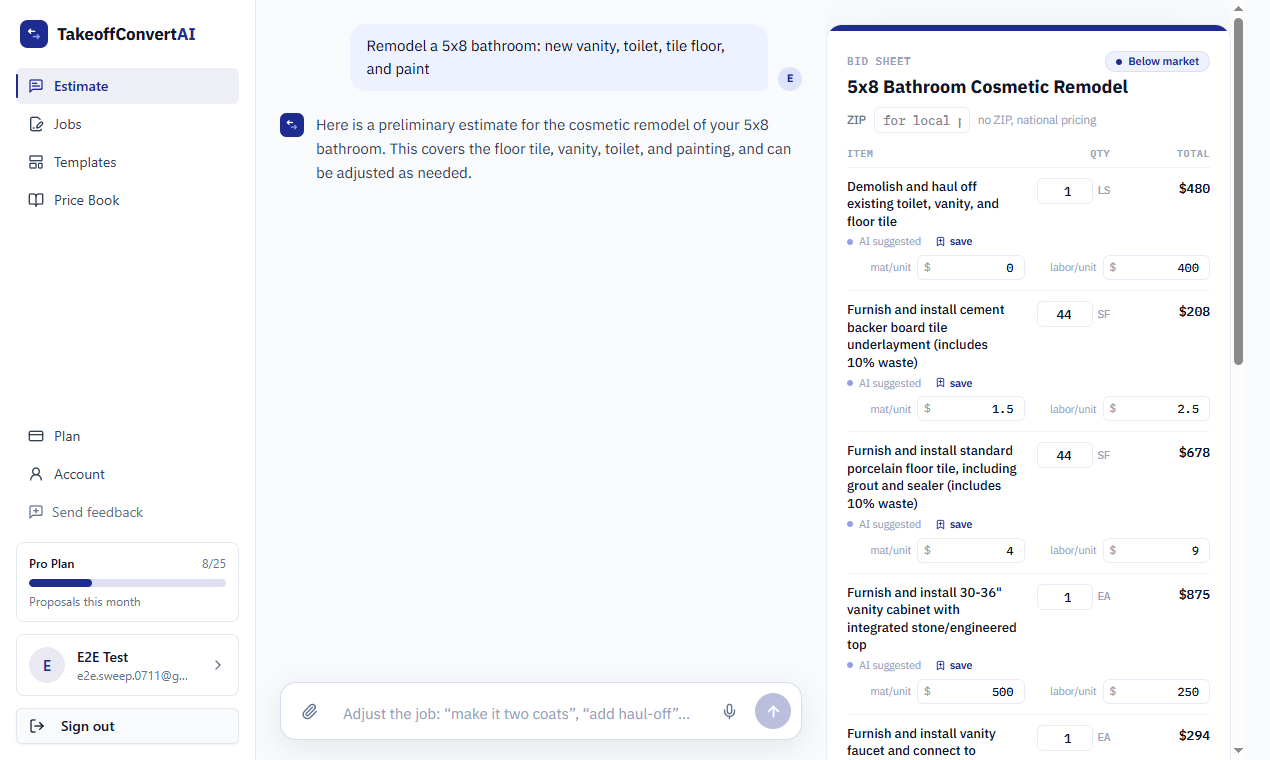
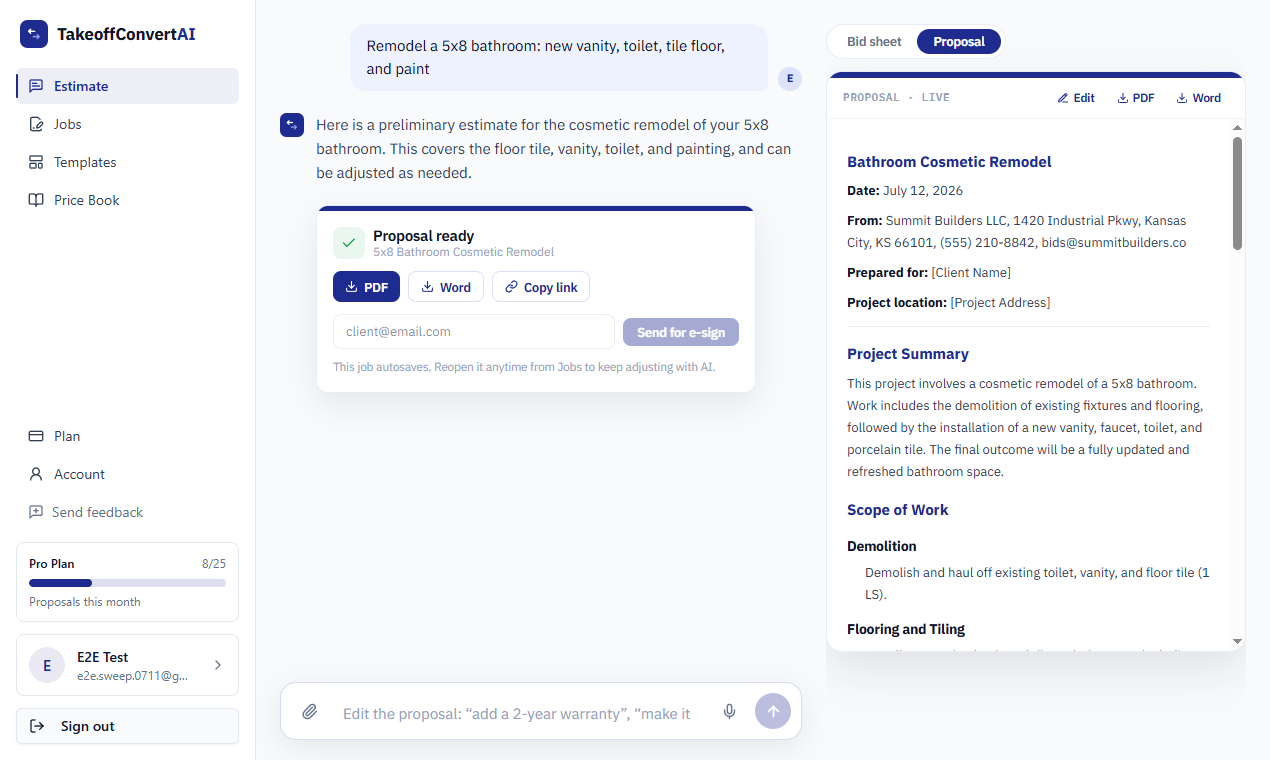
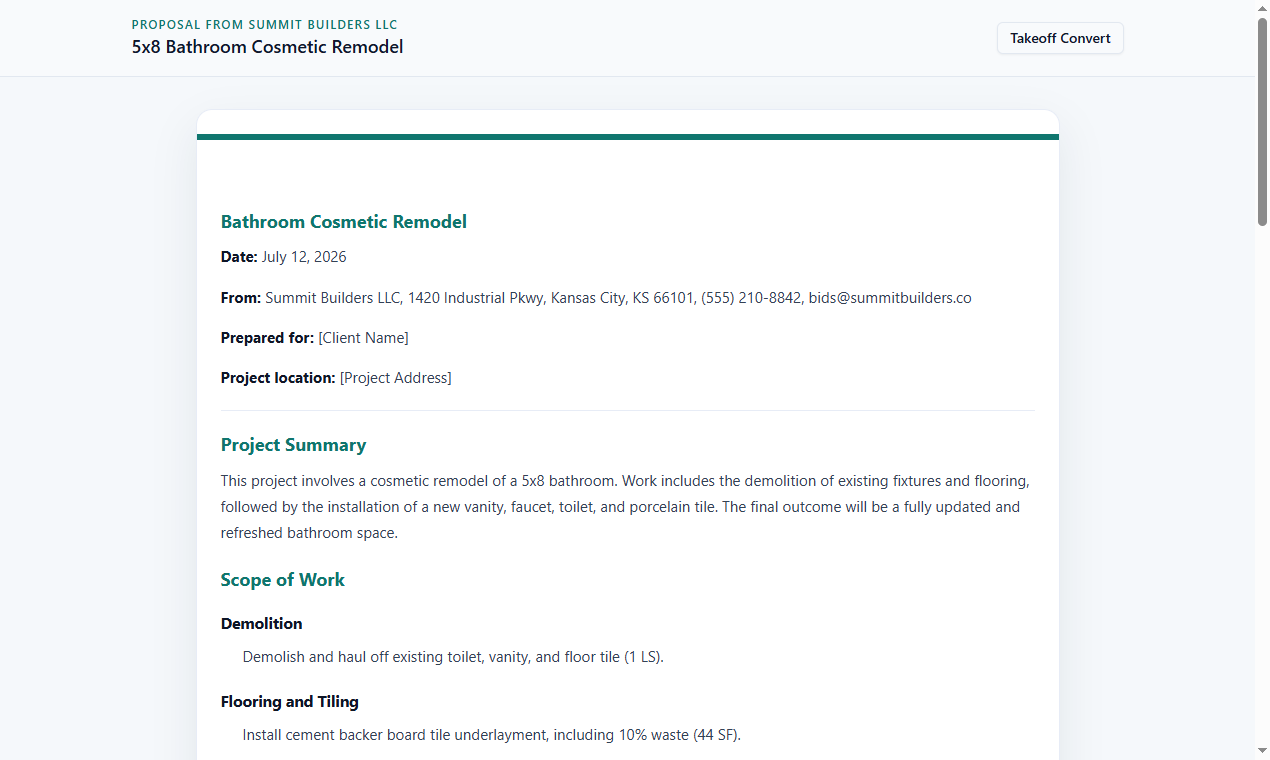
What the Takeoff Convert flow looks like
Three screens from the product, not mockups: the described job priced, the proposal, the client's signing page.
Moving your bids off Buildertrend
- 1
Export the cost catalog
Buildertrend exports cost items to CSV. Import it into the Takeoff Convert price book so the AI prices from your numbers on day one.
- 2
Bid in Takeoff Convert, build in Buildertrend
Describe the job or import the takeoff; send the proposal from Takeoff Convert and get it signed with the deposit. Once won, enter the job in Buildertrend for scheduling and job costing.
- 3
Reuse the scope
The proposal exports to Word; paste the scope into Buildertrend's specifications or attach the signed PDF to the job.
- 4
Decide at renewal
If the only thing you opened Buildertrend for was the proposal, drop to a lower tier or cancel at the annual renewal.
Buildertrend vs Takeoff Convert: questions contractors ask
Can Takeoff Convert replace Buildertrend?
No. It replaces the estimating-and-proposal step and adds e-signature, deposits, change orders and follow-ups. It has no scheduling, selections, daily logs, sub management or job costing. Many contractors use Takeoff Convert to win the job and a PM tool to run it.
Does Buildertrend have AI estimating?
Buildertrend's estimates come from your cost catalog and templates, with AI features aimed at admin tasks. Takeoff Convert generates the lines and quantities from a description or takeoff and prices anything not in your book from BLS wages and supplier pages.
How much cheaper is it?
Buildertrend starts around $199/month on an annual contract and the tiers with change orders and job costing cost more. Takeoff Convert Pro is $29/month, month to month, with 3 quotes free first.
Can I collect a deposit in both?
Yes. Buildertrend takes online payments on invoices in the client portal; Takeoff Convert collects the deposit from the signed proposal through Stripe Connect into your own account, by card or ACH.
Will Buildertrend estimates import?
Export the estimate as a spreadsheet or PDF and drop it into the estimate chat; the lines become a priced bid you can edit. Your cost catalog imports into the price book from CSV.
Takeoff Convert plans
Flat monthly pricing. Starting at $29/month vs Buildertrend's $199/month.
Free
Price your first jobs, no card
3 quotes, no card
- 3 quotes with cited prices
- Watermarked PDF
- 2 proposal templates
- Your price book and markups
Pro
For the contractor who sends the bids
7-day free trial • Cancel anytime
- Unlimited quotes with cited prices
- All proposal templates
- Send for e-signature
- Deposits from the signed proposal
- Learned price book
- 150 AI edits a day
Business
For the office with estimators
7-day free trial • Cancel anytime
- Everything in Pro
- 3 seats
- Shared price book
- Priority support
Try the describe-the-job estimate on one of your real jobs
Type the job the way you'd say it to your crew. Labor from the BLS wage for your metro, materials from live supplier prices, each with its source. No account for the first job.
Price a job free