The Proposal-First Alternative to Contractor+
Contractor+ is a field-service and job-management app for running crews. Takeoff Convert is built specifically for estimators who need to turn detailed takeoffs into professional, client-ready proposals, not manage timecards and work orders.
Stay on Contractor+ if…
Contractor+ is a capable, inexpensive all-in-one for a small service crew: estimates and invoices with supplier material pricing, e-signature, payments, scheduling, time clock, team chat and a client portal, with a free tier to start. For a handyman or a two-truck shop that wants everything in one phone app, it is hard to beat on price.
- You want scheduling, time clock, team chat and estimates in one cheap phone app.
- Your estimates are lists of catalog items and clients accept them without a written scope.
- Supplier material lookups inside the estimate are the feature you use most.
Free tier, then roughly $14 to $99/month per plan with per-user add-ons (vendor site, Nov 2026)
Switch to Takeoff Convert if…
- You feel this on Contractor+: estimates built item by item from a catalog, no AI drafting
- You feel this on Contractor+: no takeoff or bid import
- You feel this on Contractor+: the features you want sitting on the top tier
- You quote your own jobs and want the describe-the-job estimate, the proposal, the e-signature and the deposit in one flow.
- You want every AI price to carry a source: BLS metro wages for labor, a named supplier page for materials.
Free for 3 quotes, then $29/month flat, no per-seat pricing
Takeoff Convert vs Contractor+: 15 capabilities
Contractor+ column as listed on their site and in public documentation on Nov 6, 2026. Verify current details before you buy; vendors change plans.
| Capability | Takeoff Convert | Contractor+ |
|---|---|---|
| Primary job | Describe-the-job estimating that ends in a signed, paid proposal. Nothing else. | Running a small field-service crew: estimates, invoices, scheduling, time clock, team chat, client portal. |
| Describe-the-job AI estimate | Yes. Type or say the job; the AI writes scope, quantities and line items in about a minute. | No. Estimates are built from a catalog of items and templates. |
| Import an existing takeoff or bid | Yes. PDF, Excel or CSV takeoff and bid imports become priced lines; alternates and allowances are kept. | No takeoff or spreadsheet bid import listed. |
| Where labor prices come from | Hours × the BLS OES mean wage for the trade in your metro × burden, with the series cited on the line. | Your own rates per item; no external wage source. |
| Where material prices come from | A live supplier price found on the web, with the retailer page and date cited on the line. | Yes, supplier material pricing lookups from major home-improvement retailers inside the estimate. |
| Your own price book learns | Your price book always wins; after 3 won jobs a line's learned price becomes the default. | Saved items and templates; it does not learn from won jobs. |
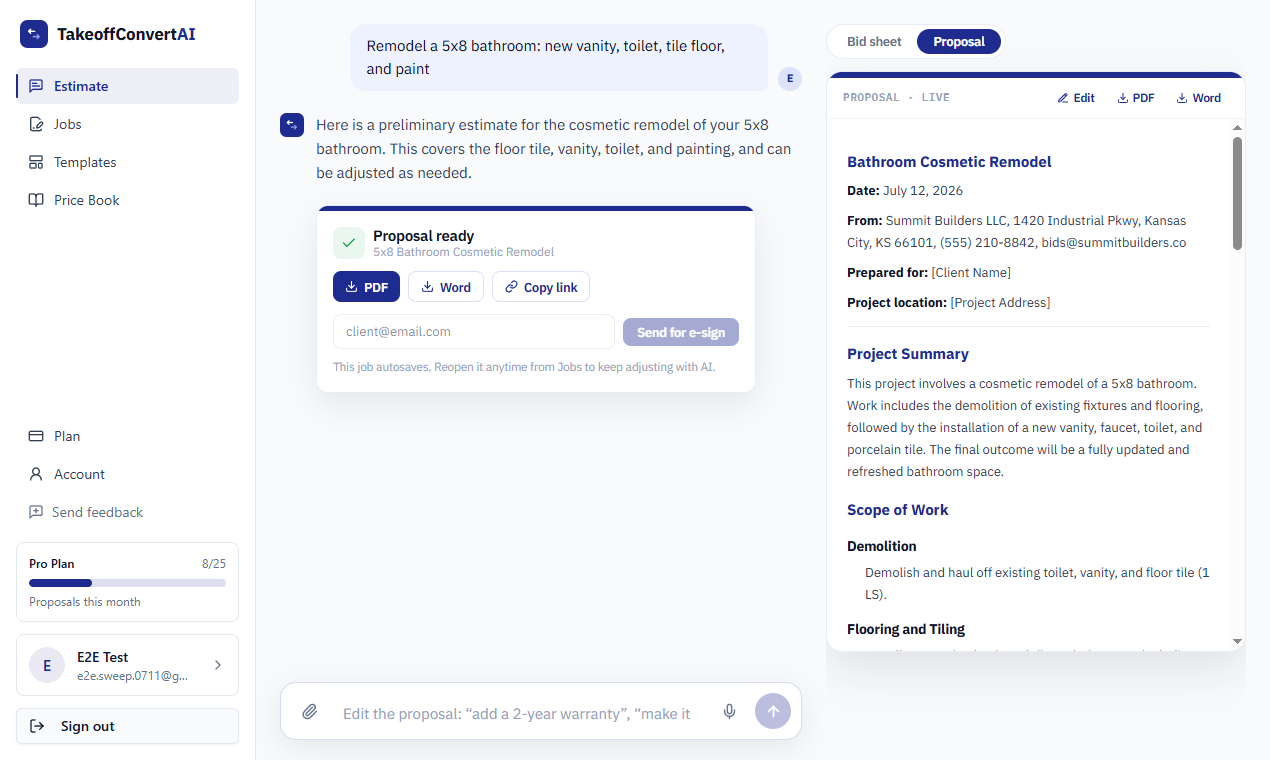
| Scope narrative in the proposal | Yes. A written scope of work per section, editable in chat ('make it two coats'). | Item descriptions and notes; no generated scope section. |
| Branded proposal templates | 8 branded templates, 4 designs, your logo and colors; Word and PDF export. | Branded estimate and invoice PDFs with your logo. |
| E-signature | Hosted accept-and-sign page; you are notified the moment it is signed. | Yes, clients sign estimates in the app or via link. |
| Deposit collected from the proposal | Yes. The signed proposal requests the deposit through Stripe Connect; card or ACH; money goes to your account. | Yes, online payments and deposits through integrated payment processing. |
| Change orders from a signed job | Yes. 'Start change order' from any signed job, numbered under the parent. | Yes, change orders on jobs. |
| Follow-up reminders on unsigned bids | Yes. Automatic reminders on unsigned bids at day 2 and day 5, owner notified on view. | Estimate reminders available on paid plans. |
| Scheduling, time clock, team chat | No scheduling, dispatch, time tracking or job costing. Invoices only for deposits and milestones. | Yes, with GPS time tracking and a client portal. |
| Pricing model | $29/mo flat (Pro) or $99/mo for 3 seats (Business). No per-user pricing. | Free tier, then roughly $14 to $99/month depending on plan, with per-user add-ons. |
| Free tier | 3 priced quotes free with no card; one job free on /try with no account. | Yes, a free plan with limits. |
What each one costs
Contractor+ plans as listed on Nov 6, 2026. Takeoff Convert prices are the live plans below.
Contractor+
| Plan | Price | Includes |
|---|---|---|
| Free | $0 | Basic estimates and invoices with limits. |
| Plus | ~$14/mo | More estimates, branding, basic scheduling. |
| Pro | ~$29/mo | Team features, time clock, change orders. |
| Ultimate | ~$99/mo | Everything, higher limits, priority support; extra users billed per seat. |
Takeoff Convert
| Plan | Price | Includes |
|---|---|---|
| Free | Free | Price your first jobs, no card |
| Pro | $29/mo · $199/yr | For the contractor who sends the bids |
| Business | $99/mo · $495/yr | For the office with estimators |
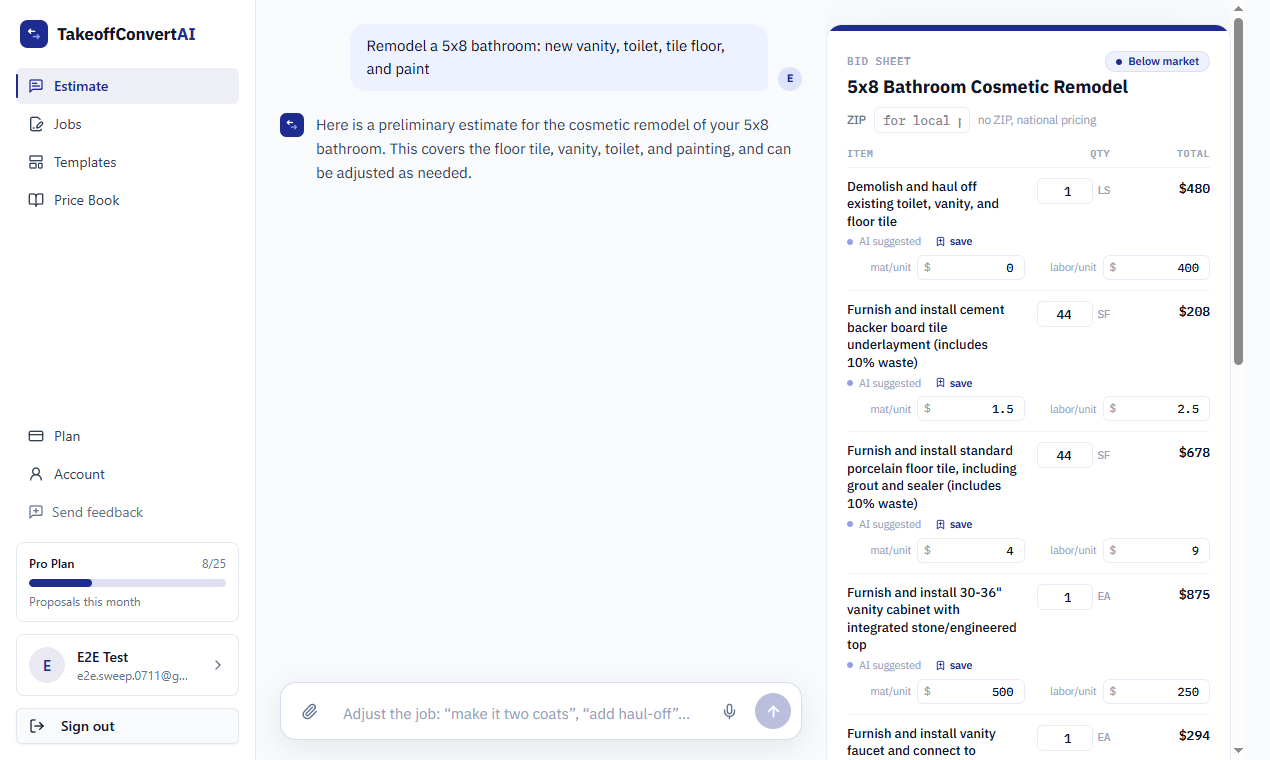
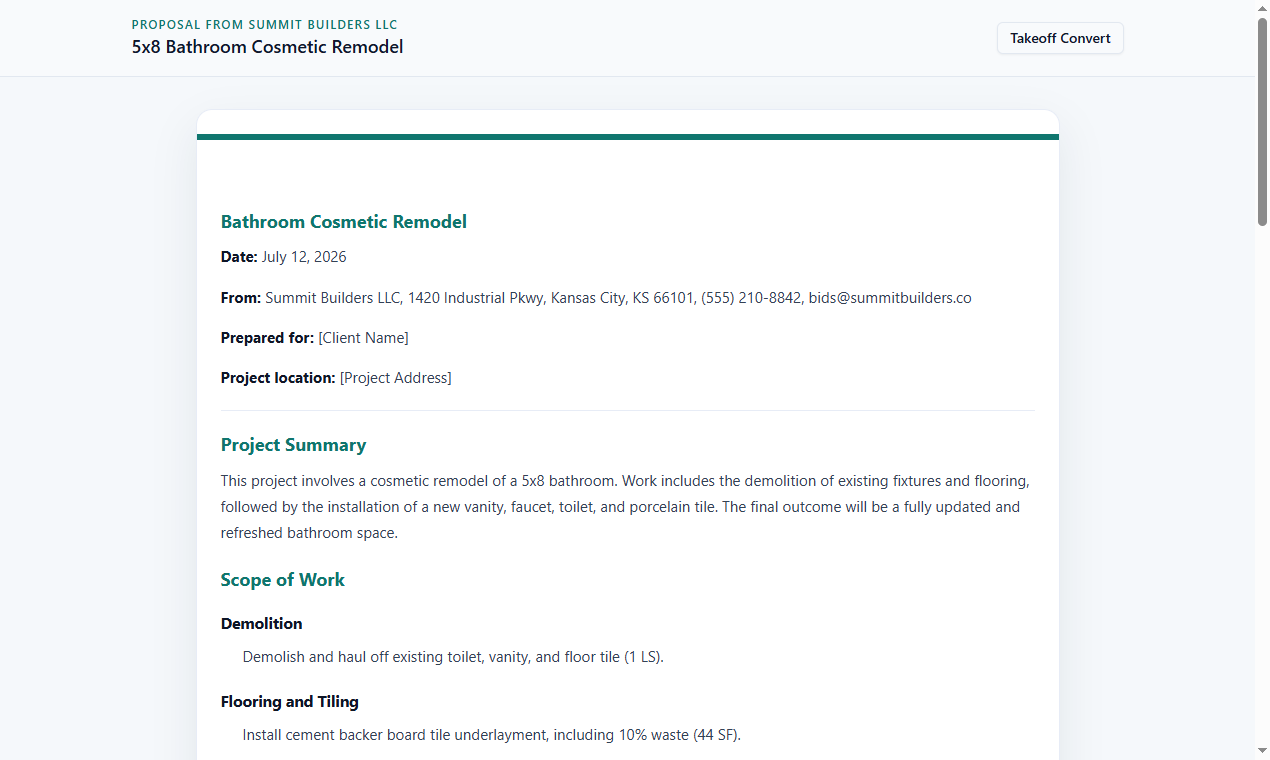
What the Takeoff Convert flow looks like
Three screens from the product, not mockups: the described job priced, the proposal, the client's signing page.
Moving your bids off Contractor+
- 1
Export your item catalog
Contractor+ exports items to CSV; import them into the Takeoff Convert price book so your rates are the defaults.
- 2
Describe the next job instead of building it
Type the job the way you'd say it. Lines, quantities and starting prices are generated; your book overrides them. Material lines cite the supplier page, like the lookups you are used to, but on every line.
- 3
Send the scoped proposal
The client gets a hosted link with the written scope, accept, e-sign and deposit. Follow-ups run automatically.
- 4
Keep Contractor+ for the crew
Scheduling, time clock and chat stay where they are if the crew depends on them. Takeoff Convert owns the bid.
Contractor+ vs Takeoff Convert: questions contractors ask
Isn't Contractor+ cheaper?
Its Free and ~$14 tiers are cheaper than Takeoff Convert Pro at $29/month, and its Ultimate tier is ~$99. Takeoff Convert is free for 3 priced quotes and the first job on /try costs nothing; you pay when you start sending.
Both show supplier material prices. What's the difference?
Contractor+ lets you look up a retailer price while building an item. Takeoff Convert's AI finds a live supplier price for each material line automatically and attaches the retailer page and date as a citation, and prices labor from the BLS wage for your metro.
Does Contractor+ have AI estimating?
Not as listed on its site; estimates are built from catalog items and templates. Takeoff Convert drafts the whole itemized bid from a plain-language description or an imported takeoff.
Can I get a written scope of work from Contractor+?
You can type notes per item. Takeoff Convert generates a scope narrative per section and lets you edit it in chat, which is what clients and lenders ask for on larger jobs.
Can Takeoff Convert run my crew's schedule?
No. It stops at the signed, paid proposal and change orders. If you need scheduling and a time clock, keep Contractor+ for that part.
Takeoff Convert plans
Flat monthly pricing. Starting at $29/month vs Contractor+'s $99/month.
Free
Price your first jobs, no card
3 quotes, no card
- 3 quotes with cited prices
- Watermarked PDF
- 2 proposal templates
- Your price book and markups
Pro
For the contractor who sends the bids
7-day free trial • Cancel anytime
- Unlimited quotes with cited prices
- All proposal templates
- Send for e-signature
- Deposits from the signed proposal
- Learned price book
- 150 AI edits a day
Business
For the office with estimators
7-day free trial • Cancel anytime
- Everything in Pro
- 3 seats
- Shared price book
- Priority support
Try the describe-the-job estimate on one of your real jobs
Type the job the way you'd say it to your crew. Labor from the BLS wage for your metro, materials from live supplier prices, each with its source. No account for the first job.
Price a job free